conelwap.blogspot.com

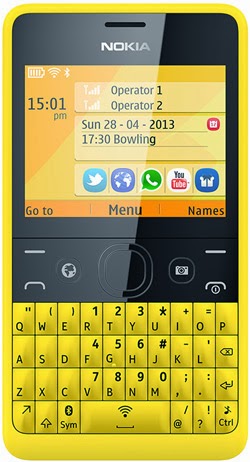
Meet the New Generation of Nokia Asha Smartphones from MTN Here's your chance to enjoy free Facebook and 12 months free internet on the largest network in Africa.
*.Free Facebook
*.12 months Free Internet
*.Super-Fast Xpress Browser Model Freebies (12 Months) Nokia Asha 210 Free monthly Facebook bundle. 100MB additional monthly bonus on activation of 100MB and above. 1 month Free Callertune. Nokia Asha 501 You can also activate MTN Data plans via the MTN branded Nokia Xpress browser.

Tex tNOKIA to 131 to opt-in to this offer and activate 100MB and above to unlock monthly freebies. Get yours at the nearest MTN store today.

U can also enjoy dis free offer by just changing ur imei numbers to dat of mtn Asha..

You can search through the blog if your new on hw to change your phone's imei numbers.

COMPLEMENT OF THE SEASON!!

UPDATE: MTN BIS Still Working On Android & PC Via SS & TunnelGuru

conelwap.blogspot.com

MTN rocks flawlessly with Simple Server and TunnelGuru on PC and Android. And if you have huge files to download like season movies, OS etc, then you can use MTN Daily BIS as it is unlimited with Simple Server. How Can I Get it working on PC?
==> Download simple server here: http://www.datafilehost.com/d/59b8af4f
==> Extract the downloaded file and open the extracted file folder, click on the 'Simpler Servers.exe and run the application.
==> Load #100 on your MTN line and send BBCDAY to 21600, when activated slot the SIM into your modem >>Connect it to your PC then After receiving the welcome to Mtn Bis message, Go to setting on your Modem and configure your
APN : web.gprs.mtnnigeria.net,
Password & username: web >> Also configure your browser and IDM to 127.0.0.1 port 8080 Open your browser and start surfing and downloading. How Can I get it Working on Android?
==>Download Android simple server app here: http://www.datafilehost.com/d/d439b2c7
==> Install it on your Android
==>Create New APN settings On Your Phone As Follows..
Proxy: 127.0.0.1
Port: 8080
APN: Web.gprs.mtnnigeria.net
Save And Activate it ss your default settings. Go to simple server and configure the settings:
==>Pproxy host: 10.199.212.2
==>Proxy Port: 8080
==>Injection Method: get
==>Injection querry/url: http://web.blackberry.com
==>Injection Host: web.blackberry.com
==>Injection line: press your enter key 4 times
==>Log leve: debug Close the settings and click the connect button. How Can I Get it Working Using TunnelGuru?
==>Download TunnelGuru here :http://tunnelguru.com /download.php
==> Make sure you have Java runtime on your computer, or download it here: http://www.oracle.com /technetwork/java/javase/downloads/jre7- downloads-1880261.html

==>sign up for an account here: http://tunnelguru.com /registration.php
if you are a new user or login as an old user.
==>Run the downloaded TunnelGuru and use the setup below.

Server: Select Demo (If you are a free user) Rport: 80
Lport: 0
User name: Input your registered tunnelguru user name
Password: Input your registered tunnelguru password Protocol: TCP
Header: host.web.blackberry.com
Tick on Use Proxy, and make sure that you input 10.199.212.2:8080 For Premium Users, use German or UK as your location
==> Go to your browser tools >> Option >> Advance >> Network >> Settings >> Then tick on NO Proxy. Then Save your settings and start browsing freely.
==>Connnect your modem and set your
APN to : web.gprs.mtnnigeria.net
Password and username: web
Connect and start surfing with your BBCDay on PC.

Note: Free users are limited to only 150MB per day, so if you wanna enjoy this, upgrade. But test it first before you upgrade your account. Enjoy it while it last.
That's all.

you can download anything you want for 24hrs until your unlimited plan time elapses and it will cost you just 100 naira to re activate the plan. Or use already activated monthly BIS Plan. Daily rocks unlimited.
Enjoy!

conelwap.blogspot.com

Simple Dial *662*6# Just choose the first Plan "jumia" subscribe for any plan monthly plan" thats all download Yourfreedom latest software from Google play and use 010.199.212.002: 8080 in your freedom proxy settings....

Then jumia.com.ng@ems24.your- freedom.deport 80 use either "post" or cgi or http or https
That's all...

How To Watch Live Matches,Movies And News On Android And PCs

conelwap.blogspot.com

This is a little tweak I found out today. I don't know if I should call it a tweak or something else. It's the use of the native browser called Internet in Android smart phones to watch/stream live tv shows. I use it to stream live matches especially the UEFA Champions League matches at night. You can use it with the Etisalat Pay Go tweak (aka Etisalad Go Pay) like me or any data bundle (at your own risk).

Things required to perform this operation, any Android Smart Phone with 3G, H or H+, or wifi, the default web browser in the Android phone, and Adobe Flash Player (mine has a factory installed version).

To check if your phone has Adobe Flash Player, go to Settings, click apps and check if it has. If it doesn't, you can download from Play Store or Mobogenie. Adobe Flash Player is needed to play live TV from any site or player. Hoping you've gotten the items, let's begin: STEPS:

1. Switch on ya data, and wait till your data connects.

2. Go to Internet (the default web browser in Android phones).

3. Go to any site (e.g www.google.com) to check if your internet is connecting.

4. If it is, go to this url to watch all live sports (not just football): www.cricfree.sx. You can bookmark the site or add it to your favorites to avoid always typing it www.cricfree.sx .

5. Click on the football icon, the second from the left on top of the page and that will take you to the schedules of all live matches that day.

6. Click on any of the matches you're interested in watching and beneath it will pop available stations that are showing the match. Click on any one and it will open, showing the match live.

7. There are about three adverts that will cover the match screen at first, but a little dark close mark (X) will show. Some are pretty difficult to see. Click on the first and second to close the adverts. The third usually counts down from 30 to 0 before the close mark (X) will appear. Once it does appear, click it and you'll be seeing your matches stream live.

8. To make your match full-screen, move your hand towards the bottom right of the match screen and you'll see the stretch symbol. Click on it and your matches will be on fullscreen.

Note: to the right of the match screen you'll see live chats from members of wizwig site commenting. This can actually be boring cuz whenever a new message pops in a useless sound will occur. To disable this sound, look beneath the chat screen to an empty text box area where you can type your chat if you're registered and logged in.

You'll see a little speaker icon, click on it to disable chat sounds and press yes in the small dialog box that will now appear a little above. The chat sounds are now cancelled.

To the left of the match screen, you'll see stations listed there starting from Sky Sports 1 to 5, Sky Sports News (For match highlights and news and goals, my personal favourite).

There's also a station called BEIN Sports, it contains BEIN Sport 1 to 12 (1 to 10 are Arabic speaking channels while 11 and 12 are English channels). They also have SKY MOVIES which contains about 5 other sub channels viz Comedy, Premiere, Action, Sci-Fi and Horror. At my last count, the total number of stations here were over 70.

Your network may make it buffer or seem to skip, if that happens, I have one advice for ya: "Patience is a virtue." That's why I love streaming UEFA Champions League matches cuz they're usually held at night when the network is free from Nigerian gigs killers.

Here's another site, but this one contains live news, CNN, FOX, ESPN1,2, MTV and my favourite here is Nickelodeon (no mind me o) and other stations. http://www.usachannels.tv

The same rules about closing adverts and chats sounds should be followed here.

So, basically, we've discussed two sites: http://www.cricfree.sx(for live matches and a few movies) andhttp://www.usachannels.tv (for live international and sports news).

The same method can be applied on PC using any browser (I recommend Firefox) and make sure you download and install Adobe Flash Player from www.adobe.com and activate all its plugins and add ons.

Enjoy!
TRENDING POST...